The moodboard app that builds itself.
Most moodboard apps hand you a blank canvas. archivd starts with what you already save, the outfits, rooms, places and quotes you keep coming back to, and lays them out as your moodboard.

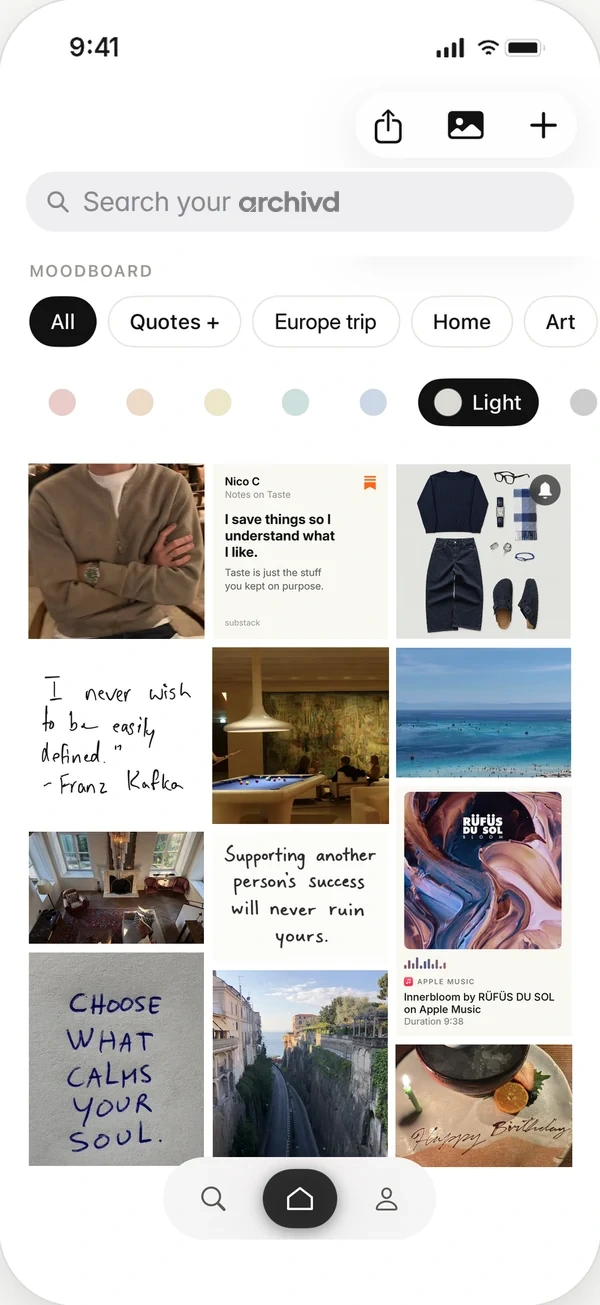
Start with what you already save
Tap Share in Instagram, TikTok, Pinterest, YouTube, X or any app with a share button, then pick archivd. The post lands on your wall without you leaving what you were doing. Add your own photos and screenshots from your camera roll too.
Everything visual you save shows up on your moodboard automatically. There's nothing to cut out, crop or drag into place before it starts to look like you.
Filter by color, or by collection
Pull the whole board down to one shade: warm, green, blue, light or dark. It's the fastest way to see a palette you didn't know you had.
Or narrow it to one collection, like Home, Style or a Europe trip, and get a moodboard for just that part of your life. Every collection keeps its own cover and colors.
Share it as one picture
When you want to show someone your taste, share the board as a single image. It works for a friend helping with a room, a stylist, or a story post.
Private until you share it
No feed, no followers, no algorithm deciding what you see. Your board is yours unless you choose to share it.
Save from any app, see it all as your moodboard, and get it back when it matters.
Questions
Is archivd a free moodboard app?
Yes. Boards, moodboards and export are free, with 200 saves and one board shared with friends. archivd Plus adds unlimited saves, boards with all your friends, every widget and full-quality photos and clips.
Can I make a moodboard from Pinterest and Instagram saves?
Yes. Use the Share button in Pinterest, Instagram or any other app and pick archivd. Saves from every app sit on the same board.
Is archivd on Android?
Not yet. archivd is on iPhone today.